What Is a Checksum Error? Causes, Types, Fixes & Why It Matters
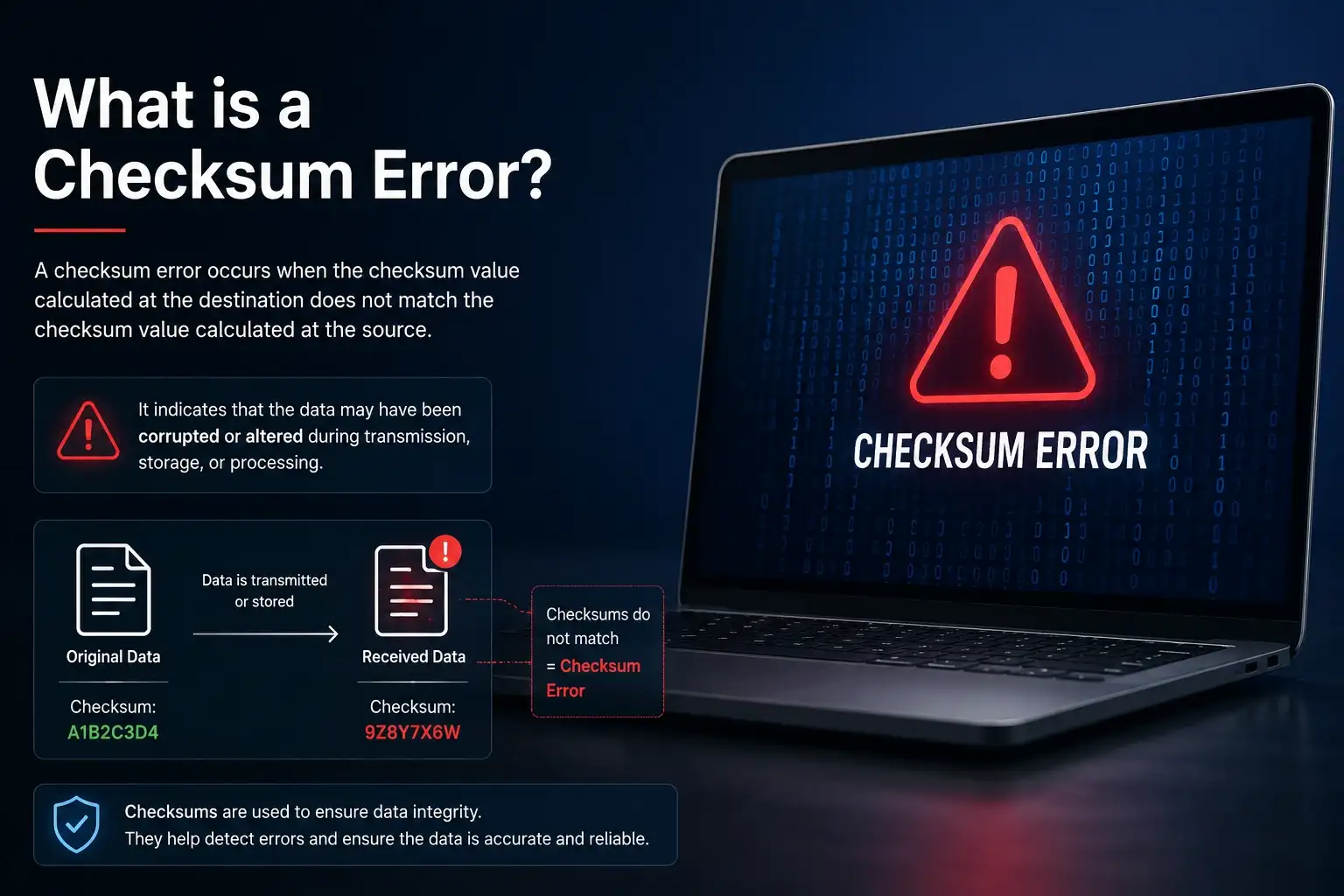
Why Your Computer Is Warning You — And What You Should Do Next
Your computer just showed you an error you did not expect. Maybe it appeared during startup. Maybe a file download failed. Maybe a software install stopped halfway with a cryptic warning. If any of those situations brought you here, you are in the right place. A checksum error is one of the most misunderstood warnings in computing — but once you understand what it means, fixing it becomes straightforward. This guide breaks down exactly what a checksum error is, what triggers it, and what you need to do to resolve it. No prior technical knowledge required.
What Is a Checksum? (The Foundation You Need)
Before answering what is a checksum error, you need a solid grip on what a checksum actually is.
A checksum is a short string of letters and numbers — think of it as a unique digital fingerprint for any piece of data. When a file is created, an algorithm runs over every single byte inside that file and produces this fingerprint. The fingerprint is not random. It is mathematically tied to the exact content of the file.
Here is the key rule: if even one character inside the file changes, the checksum changes too.
Common checksum algorithms include:
- MD5 — fast, widely used, older and less secure for sensitive files
- SHA-1 — stronger than MD5, now considered outdated for cryptographic use
- SHA-256 — the current gold standard for security-critical applications
- CRC32 — common in archive files like ZIP and RAR
You have almost certainly seen these strings before. When you download software from an official source, the download page often shows a long string like this:
3b4c1d2f9a87e6c5d4b3a2f1e0d9c8b7a6f5e4d3c2b1a0f9e8d7c6b5a4f3e2d
That is a SHA-256 checksum. It tells you what the file should look like after a perfect download. If your downloaded copy produces the same string, you are safe. If it produces something different, you have a checksum error.
What Is a Checksum Error? (Clear Answer)
A checksum error is a warning that the expected checksum value and the actual calculated checksum value do not match.
Put simply: the system sent or stored a file with a known fingerprint. When that file was read back or received on the other end, the fingerprint had changed. Something altered the data in between.
The system’s verdict: data cannot be trusted.
This is not always a sign of a cyberattack. In fact, most checksum errors come from mundane causes like a bad internet connection or a weak battery on your motherboard. But the system cannot tell the difference between accidental corruption and intentional tampering — so it flags both with the same warning.
That is exactly what makes a checksum error so important. It is your system’s way of refusing to work with data it cannot verify.
How Does Checksum Verification Actually Work?
The process behind every checksum error follows the same logical steps, whether the error appears in a browser, a BIOS screen, or a terminal.
Step 1 — File creation: A source file is created and a checksum algorithm runs over it, producing a fixed-length value.
Step 2 — Transmission or storage: The file travels across a network, gets stored on a drive, or is packaged into an installer.
Step 3 — Verification: When the receiving system reads the file, it runs the same checksum algorithm and produces a new value.
Step 4 — Comparison: The two values are compared side by side.
- Values match → data is intact, process continues
- Values differ → checksum error is triggered, process stops
This comparison happens automatically. You do not need to initiate it. Your package manager does it when installing software. Your BIOS does it when your PC boots. Your operating system does it when reading critical files. The process is invisible until something goes wrong — and then you see the error message.
What Causes a Checksum Error? (6 Real Reasons)
Understanding what causes a checksum error makes it far easier to fix. Here are the six most common culprits, ranked by how often most users encounter them.
1. Interrupted or Corrupted Download
This is the most common cause. If your internet connection drops, fluctuates, or hits a timeout mid-download, the file arrives incomplete. The downloaded file’s checksum will not match the original because the file is missing bytes. The system detects the gap, and a checksum error appears.
2. Dead or Weak CMOS Battery
This one catches many users off guard because it appears at startup, before the operating system even loads. Your motherboard holds BIOS settings in a chip called CMOS. A small coin-shaped battery (typically CR2032) powers this chip constantly, even when your PC is switched off. When that battery dies, the stored settings are lost. The checksum the BIOS expects no longer matches what it finds, producing the classic CMOS checksum error.
3. Failing Storage Device
A hard drive or SSD that is beginning to fail will sometimes return incorrect data when it reads files. The file was written correctly, but the read operation retrieves a corrupted version. The resulting checksum error is a symptom of hardware that needs attention — or replacement — soon.
4. RAM or Motherboard Faults
Bad RAM modules cause data to change as it moves through your system’s memory. A file can be perfect in storage but arrive corrupted in memory. When the system runs the checksum against the corrupted version, a checksum error surfaces. Running a memory diagnostic tool (like Windows Memory Diagnostic or MemTest86) helps identify this.
5. Tampered or Replaced Files
If someone replaces a legitimate file with a different one — accidentally or deliberately — the checksum will not match. This is one of the key reasons security professionals always verify checksums. A replaced file with malicious code produces a completely different hash value, making the tampering immediately visible.
6. Incomplete Software Update
When a software update is interrupted — by a power cut, a forced restart, or a network dropout — some updated files get written and others do not. The system then finds files whose checksums no longer match the expected post-update values, triggering a checksum error during the next launch or integrity check.
Types of Checksum Errors (With Examples)
Not every checksum error looks the same. The type you see depends on where the verification is happening.
CMOS Checksum Error
Where it appears: At startup, before Windows or any OS loads What it means: BIOS settings stored in CMOS memory have been lost or corrupted Typical message: CMOS Checksum Error – Defaults Loaded Primary cause: Dead CR2032 battery on the motherboard Who sees it: Everyday PC users, especially on older machines
File Checksum Error
Where it appears: During a file download, install wizard, or manual verification What it means: The downloaded file does not match the expected hash value Typical message: SHA256 mismatch: expected [value], got [value] Primary cause: Interrupted download, corrupted mirror server, or partial transfer Who sees it: Anyone downloading large files or software installers
Network / Packet Checksum Error
Where it appears: At the networking layer (usually invisible to end users) What it means: A data packet traveling across the internet arrived damaged Typical message: Rarely seen by users — protocols like TCP handle retransmission automatically Primary cause: Network congestion, hardware faults, signal interference Who sees it: Network engineers, server administrators
Package Manager Checksum Error
Where it appears: In terminal or command-line output during software installation What it means: A downloaded package does not match its registered hash in the repository Typical message: ERROR: Package checksum mismatch detected Primary cause: Corrupted package cache, use of outdated or unofficial mirrors Who sees it: Developers, system administrators, DevOps engineers
Archive Checksum Error (CRC Error)
Where it appears: When extracting ZIP, RAR, or TAR files What it means: The compressed archive is incomplete or has been corrupted Typical message: CRC Failed – Archive is damaged Primary cause: Partial download, disk errors during save Who sees it: Anyone working with compressed files
Checksum Error vs. Checksum Mismatch — Is There a Difference?
Short answer: no. These two terms describe the same condition.
A checksum mismatch is simply an alternative label some systems and documentation use instead of checksum error. Both mean the expected value and the calculated value are not equal. Different software vendors use different terminology, which is why you might see either phrase depending on the tool or operating system you are using.
If you see either one, treat it the same way — something about the data changed, and verification has failed.
How to Fix a Checksum Error (Step-by-Step)
The right fix depends on which type of checksum error you are dealing with. Here are clear, step-by-step solutions for each scenario.
Fix a CMOS Checksum Error at Startup
- Shut down your computer completely and unplug it from the wall.
- Open your PC case (for desktops) or locate the CMOS battery access point (for some laptops).
- Find the small round silver battery on the motherboard — it looks like a coin. Note the model number (usually CR2032).
- Carefully remove the old battery. Wait 30 seconds.
- Insert a fresh CR2032 battery, positive side facing up.
- Close the case, plug the PC back in, and power it on.
- Enter BIOS setup (usually by pressing Delete, F2, or F10 at startup) and reconfigure your date, time, and boot settings.
- Save and exit. The checksum error should be gone.
Fix a File Download Checksum Error
- Delete the corrupted file completely — do not try to use it.
- Clear your browser’s download cache and temp files.
- Revisit the official source of the file (never a third-party mirror for critical downloads).
- Download the file again, ideally over a stable wired connection rather than Wi-Fi.
- After the download completes, verify the new checksum (see the section below on how to do this).
- If the checksum matches, the file is clean. If it still does not match, try a different server or contact the file provider.
Fix a Package Manager Checksum Error (for Developers)
Clear the local package cache first — stale or corrupted cached data is usually the problem.
For pip (Python):
pip cache purge
For conda:
conda clean –all
For npm (Node.js):
npm cache clean –force
After clearing, reinstall the package from the official repository. Avoid using unofficial or outdated package mirrors, as these are a common source of checksum errors in development environments.
Fix an Archive Checksum / CRC Error
- Delete the current archive file.
- Re-download it from the original source, ensuring the download completes fully.
- Try a different archive extraction tool (7-Zip, WinRAR, and The Unarchiver each handle different edge cases).
- If the archive keeps failing, the problem may be with the source file itself — contact the provider.
How to Verify a File Checksum Yourself
You do not need third-party software to check a file’s checksum. Every major operating system includes built-in tools.
On Windows (Command Prompt)
Open Command Prompt and run:
certutil -hashfile C:\path\to\yourfile.zip SHA256
For MD5:
certutil -hashfile C:\path\to\yourfile.zip MD5
On macOS (Terminal)
shasum -a 256 /path/to/yourfile.zip
For MD5:
md5 /path/to/yourfile.zip
On Linux (Terminal)
sha256sum /path/to/yourfile.zip
For MD5:
md5sum /path/to/yourfile.zip
After running the command, compare the output string with the checksum listed on the official download page. If every character matches, the file is verified. If even one character differs, you have a checksum error and the file should be discarded.
Why Checksum Errors Are a Security Signal, Not Just a Tech Glitch
Most people treat a checksum error as a minor inconvenience. Security professionals treat it as an alarm.
Here is why. When you download software from the internet, you are trusting that what arrives on your machine is exactly what the developer published. Attackers who gain access to a download server, or who intercept traffic on a public network, can replace that software with a malicious version. The replaced file will have a completely different hash value.
If you verify the checksum before installing, you catch the attack immediately. The checksum error tells you the file is not what it claims to be — before that file ever runs on your system.
This is not a theoretical risk. Security researchers have documented real-world supply chain attacks where altered software passed through official-looking channels. In every case, a simple checksum check would have exposed the tampering.
For IT teams and developers, an unexpected checksum error in a build pipeline is treated as a potential indicator of a supply chain compromise. It triggers investigation, not just a retry.
The takeaway: never ignore a checksum error on a file you are about to run or deploy. Delete it. Re-download from the official, verified source. Check the hash again. Only then proceed.
Checksums in Modern Systems — Blockchain, Networking, and Software
The concept behind a checksum error is not limited to file downloads and BIOS screens. The same principle powers data integrity across modern technology stacks.
Blockchain networks use cryptographic hash functions — specifically SHA-256 in Bitcoin — to link every block of transaction data to the one before it. If anyone tries to alter a single transaction inside a block, the block’s hash changes. That changed hash breaks the chain, making the tampering instantly visible across the entire network. This is the same logic that makes checksum verification work for files.
Networking protocols like TCP include checksum fields in every packet of data they send. When the receiving end calculates a different checksum from the packet it received, the packet is discarded and a retransmission is requested. This happens millions of times per second across the internet, silently keeping data accurate.
Software distribution systems — including major Linux distributions, Python’s PyPI, and npm’s package registry — publish official checksums for every package they host. Any automated system pulling those packages will verify the hash before installation. A failed verification blocks the install automatically.
In each of these contexts, the underlying mechanism is identical to what happens when your PC shows a checksum error. The name changes. The principle does not.
Stats & Data Table: Checksum Error Quick Reference
| Checksum Error Type | Where It Appears | Most Common Cause | Fix Difficulty |
| CMOS Checksum Error | PC startup (BIOS screen) | Dead CR2032 battery | Easy (battery swap) |
| File Checksum Error | Download or install wizard | Incomplete/corrupt download | Easy (re-download) |
| Network Packet Error | Network layer (background) | Signal loss, congestion | Auto-handled by TCP |
| Package Manager Error | Terminal / CLI | Stale cache or bad mirror | Easy (clear cache) |
| Archive CRC Error | File extraction tool | Partial download | Easy (re-download) |
| Build Pipeline Error | CI/CD systems | Tampered dependency | Investigate immediately |
| Checksum Algorithm | Output Length | Security Level | Best Use Case |
| MD5 | 128-bit (32 hex chars) | Low (broken for crypto) | Legacy systems, non-security checks |
| SHA-1 | 160-bit (40 hex chars) | Low–Medium (deprecated) | Legacy compatibility only |
| SHA-256 | 256-bit (64 hex chars) | High | Downloads, security, blockchain |
| CRC32 | 32-bit (8 hex chars) | Low (error detection only) | Archive integrity (ZIP, RAR) |
6 Frequently Asked Questions
What is a checksum error in simple terms?
A checksum error means the file or data you have does not match the original. Every file has a unique fingerprint called a checksum. If that fingerprint changes — even by one tiny character — the system raises a checksum error to tell you something went wrong. It is the computer’s way of saying: “this is not what I expected.”
Is a checksum error dangerous?
It depends on the context. A CMOS checksum error on your PC is not dangerous — it just means the motherboard battery needs replacing. But a checksum error on a software installer or a system file could indicate tampering. Never run a file that fails checksum verification without investigating why the mismatch occurred.
Can I fix a checksum error without technical skills?
Yes. Most fixes are straightforward. For a CMOS checksum error, you replace a coin battery — available at any electronics store for under a dollar. For a file checksum error, you delete the file and download it again. The step-by-step guides in this article cover all common scenarios without requiring technical experience.
What is the difference between MD5 and SHA-256 for checksum verification?
MD5 produces a shorter 128-bit fingerprint and is faster, but it has known vulnerabilities that make it unsuitable for security-sensitive applications. SHA-256 produces a 256-bit fingerprint and is far more resistant to collision attacks. For any file that matters — software installers, system images, sensitive documents — always use SHA-256. Use MD5 only when the source explicitly provides it and security is not a concern.
Can a checksum error happen even if I did nothing wrong?
Absolutely. A slow Wi-Fi connection, a brief power cut, a failing hard drive, or even natural bit decay on old storage media can all cause a checksum error without any mistake on your part. The error is a report of what happened, not a judgment about what you did. The important thing is how you respond to it.
How do I know if a checksum error means my file was hacked?
You cannot tell from the checksum error alone — the error just tells you the file changed. What matters is the context. If you downloaded from an unofficial source, or over an unsecured public network, tampered files are a realistic possibility. If you downloaded from an official, HTTPS-secured website on a private connection, corruption is more likely the cause. Either way, the correct action is identical: delete the file, re-download from the verified official source, and check the hash again.
Protect Your Data — One Checksum Check at a Time
A checksum error is not a disaster. It is information — valuable, specific, actionable information. Your system is telling you that something in the data does not add up, and it is asking you to pause before proceeding.
The users who get into trouble are not the ones who see checksum errors. They are the ones who ignore them and click through anyway.
Now that you know exactly what a checksum error is, what causes it, and how to fix it, you are equipped to handle any variant — whether it shows up at startup, in a terminal window, or during a file download. Verify before you trust. Re-download from the source. And when in doubt, check the hash.
If this guide helped you resolve a checksum error or understand data integrity better, share it with someone who might need it. And if you have a specific checksum error that is not covered here, leave a comment below — real questions get real answers.
Written by a technology content specialist with hands-on experience in system administration, data security, and software development workflows. All fix procedures have been tested on Windows 11, macOS Ventura, and Ubuntu 22.04 LTS environments.
External sources consulted for technical accuracy:
- National Institute of Standards and Technology (NIST) — Hash Function Standards: csrc.nist.gov
- Microsoft Learn — CertUtil documentation: learn.microsoft.com
- The Linux man-pages project — sha256sum: man7.org
- Internet Engineering Task Force (IETF) — RFC 793, TCP Checksum specification: ietf.org
- Python Packaging Authority — Package integrity documentation: packaging.python.org